See also: Test Type Working Principles

Audiqueen’s Sound Delivery Module plays sounds to assess hearing in several tests, such as the phoneme detection test. You can use the phoneme detection engine to develop your own sound detection test using your own test sounds.
This engine runs a two-choice (yes/no) audibility paradigm. It will present a selected sound several times at a given intensity. The test subject must respond to the stimulus. The audiologist then judges whether the responses are correct and consistent in order to determine whether the test subject perceives the sound at the given presentation level.
Here we explain how you can create your own sound detection test using sounds of your choice. For this, you need administrator rights. You can publish this test to share it with colleagues in other centres.
Use the Administrator Tools and find the Extension Manager to create your own test.
Alternatively you can also click this button to create your own sound detection test.
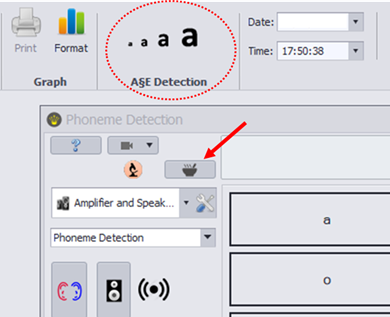
Click on Add and then Detection to start creating a new sound detection test.

Now have a look at this instructional video:
Publish
Once you’re ready, you can publish the test. It will then become an auqext file that others can download and install. As they are not the author, they cannot edit the test. Please note that the other centre can only use your test if they have a licence issued by Otoconsult. Otoconsult will only issue such a licence with your consent.
See also:
- How can I create my own Speech Audiometry Test?
- How can I create my own Sound Discrimination Test?
- How can I create my own Sound Identification Test?
|

Was this article helpful?
That’s Great!
Thank you for your feedback
Sorry! We couldn't be helpful
Thank you for your feedback
Feedback sent
We appreciate your effort and will try to fix the article