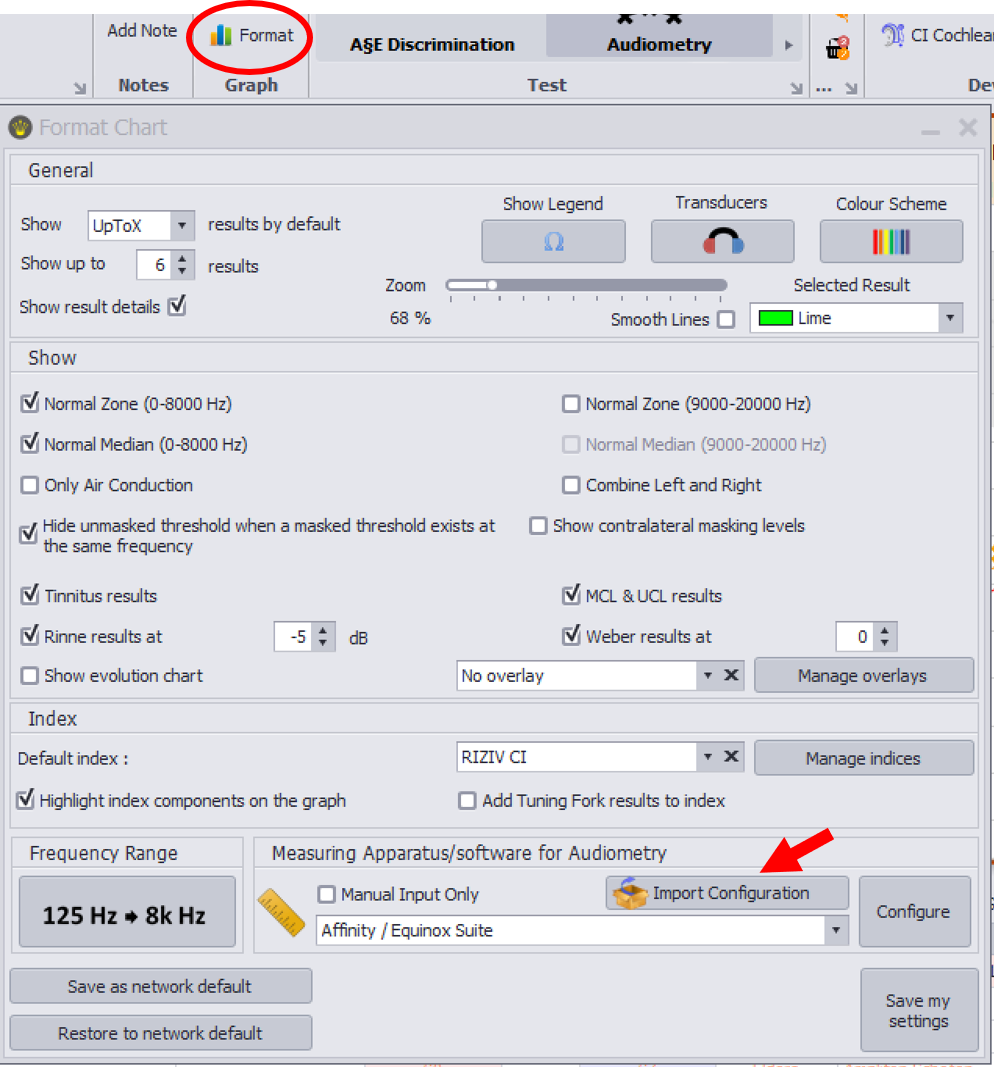
Audiqueen can retrieve data from various measuring instruments (audiometer, tympanometer, rhinometer, rhinomanometer, document scanner, camera, endoscope, microscope, etc.). The measuring instrument must be connected to the computer on which Audiqueen is running, and an appropriate connector must be selected and configured in the ‘Format’ window.
If you wish to connect the measuring instrument to another computer, you do not need to reconfigure the entire setup.
To do this in an easy way, you must set up the new computer on the network. You then install Audiqueen on it. The old computer (with the connected instrument) remains connected for the time being.
You can now click the button "Import Configuration" in the format window for the test type on the new computer. You will then see a list of the other computers; select the old computer whose configuration you wish to adopt.
Next, connect the measuring instrument to the new computer; install its corresponding (often proprietary) software, and make sure the measuring instrument has been correctly identified by its corresponding software. Now the test should be correctly available in Audiqueen.
Was this article helpful?
That’s Great!
Thank you for your feedback
Sorry! We couldn't be helpful
Thank you for your feedback
Feedback sent
We appreciate your effort and will try to fix the article